 CADian
LOOKING FOR
SOMETHING?
Top Searched
Frequently asked questions from CADian are provided in our FAQ Board.
Check your answers quickly.
FAQ
Support
As evidenced by over 30 years of development history, trust-worthy Korean CAD, CADian!

|
FAQ
·
2026.04.17
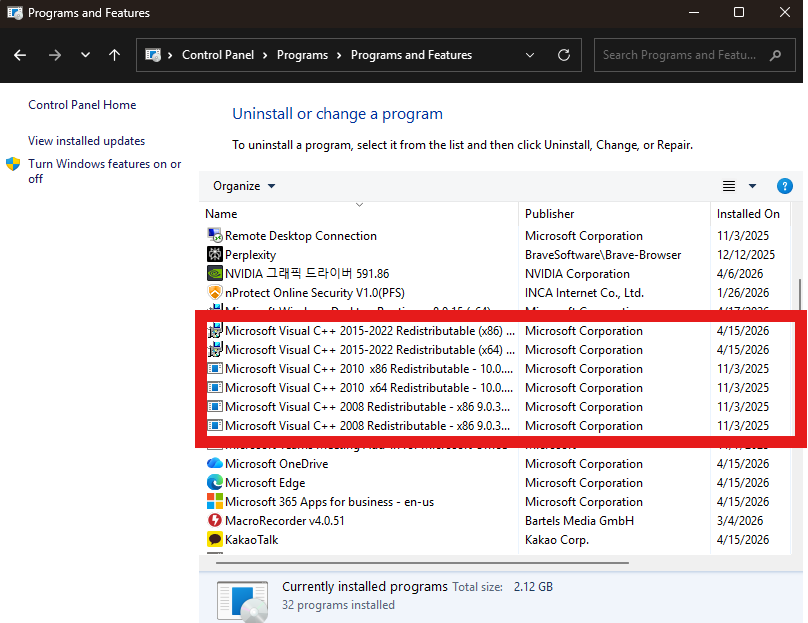
How to fix mfc140u.dll Error
|
|---|
|
Issue Cause Solution 1. Go to Control Panel → Programs → Uninstall a program 2. Uninstall all Microsoft Visual C++ Redistributable packages
4. Extract the file and install the included packages Note Reference Microsoft Build - Microsoft Visual C++ Redistributable latest supported downloads |



Business Name : Wizcore, Inc.
Address : 1009, 115, Gasan digital 2-ro, Geumcheon-gu, Seoul, Republic of Korea (08505)
CEO : Seung Hoon Park Business Registration Number : 105-81-74484
Sales : partner@cadian.com
Support : help@cadian.com
Tel : +82 2-323-0286
Fax : +82 2-2107-3286
Address : 1009, 115, Gasan digital 2-ro, Geumcheon-gu, Seoul, Republic of Korea (08505)
CEO : Seung Hoon Park Business Registration Number : 105-81-74484
Sales : partner@cadian.com
Support : help@cadian.com
Tel : +82 2-323-0286
Fax : +82 2-2107-3286
Copyrightⓒ Wizcore, Inc. All Rights Reserved.