Support

As evidenced by over 30 years of development history, trust-worthy Korean CAD, CADian!

Utility Archive · 2026.02.26
[Lisp #147] TTA : Align Text (Table)

Hi,

This is CADian.

We have prepared 400+ Lisp programs to aid your CAD experience, free of charge!

Full List of all CADian Lisps : [Full CADian Lisp List]

How to Install : [CADian Lisps Download & Install Guide]


====================================================


1/ Command :

  • TTA


2/ Description :

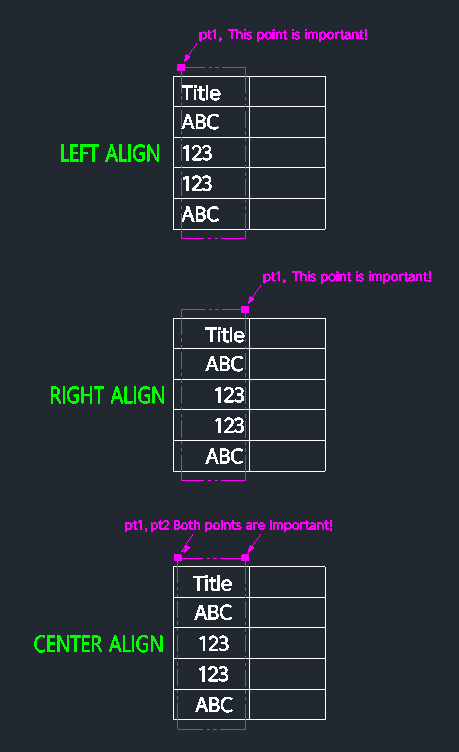
This tool allows you to align text within a table cell to the left, center, or right.

  • Flexibility: It offers three alignment options: Left (1), Center (2), and Right (3).

  • Selection Filter: It automatically filters the selection to only affect text objects, so you don't need to worry if table lines are included in your selection window.

  • Compatibility: This is a dedicated CADian Lisp tool and works only within CADian.


3/ How to Use :

  1. Type TTA in the command line and press Enter.

  2. Enter an Alignment Option number:

    • 1: Left Align

    • 2: Center Align

    • 3: Right Align.

  3. Select the area (draw a rectangle) encompassing the text and the table cell boundaries:

    • For Left Align (1): Ensure the left edge of your selection rectangle aligns with where you want the text to start.

    • For Center Align (2): define the rectangle carefully to cover the full width of the cell (left and right boundaries) so the text centers correctly between them.

    • For Right Align (3): Ensure the right edge of your selection rectangle aligns with the desired right boundary.

  4. The text within the selected area is automatically aligned based on your choice.


Added to cart.

VIEW CART

Please sign in first.

JOIN