Support

As evidenced by over 30 years of development history, trust-worthy Korean CAD, CADian!

Utility Archive · 2026.02.27
[Lisp #199] ROOT : Draw Radical Denominator

Hi,

This is CADian.

We have prepared 400+ Lisp programs to aid your CAD experience, free of charge!

Full List of all CADian Lisps : [Full CADian Lisp List]

How to Install : [CADian Lisps Download & Install Guide]


====================================================


1/ Command :

  • ROOT


2/ Description :
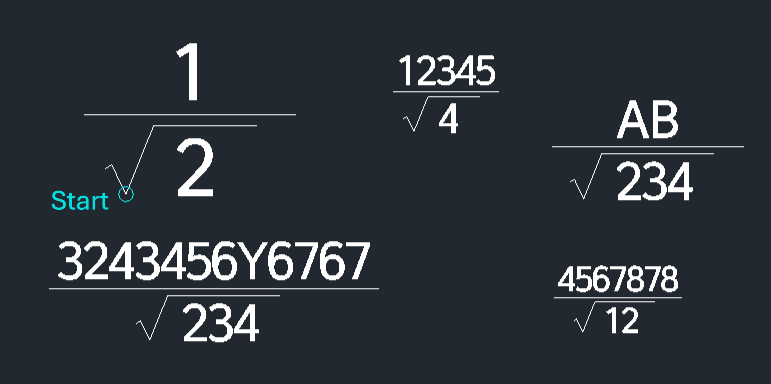
This tool allows you to create a mathematical formula where a square root appears in the denominator of a fraction.

  • Dynamic Formatting: The length of the horizontal fraction bar automatically adjusts based on the length of the text input.

  • Text Size Control: The size of the text is determined by the DIMTXT or DIMSCALE variables. You should adjust these variables before running the command if you need a specific text size.

  • Compatibility: This is a dedicated CADian Lisp tool and works only within CADian.


3/ How to Use :

  1. Adjust Text Size (Optional): Change the DIMTXT or DIMSCALE variable to set the desired text size.

  2. Type root in the command line and press Enter.

  3. Click the Start Point where the formula will be placed.

  4. Enter the Value inside the Square Root (Denominator).

  5. Enter the Value for the Numerator (Top part of the fraction).

  6. The complete formula is generated with the square root symbol in the denominator and the fraction bar correctly sized.


Added to cart.

VIEW CART

Please sign in first.

JOIN