Support

As evidenced by over 30 years of development history, trust-worthy Korean CAD, CADian!

Utility Archive · 2026.02.27
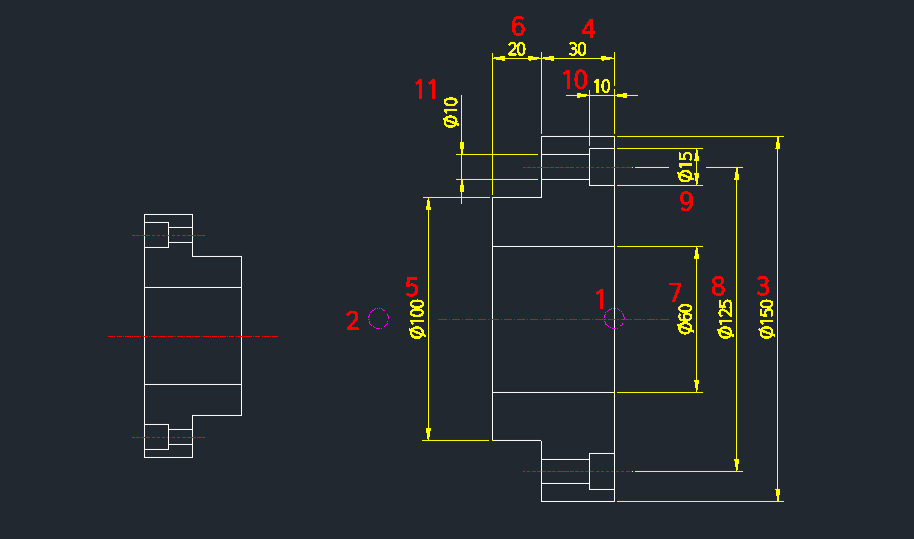
[Lisp #201] COVER2 : Draw Bearing Cover (C-Bore)

Hi,

This is CADian.

We have prepared 400+ Lisp programs to aid your CAD experience, free of charge!

Full List of all CADian Lisps : [Full CADian Lisp List]

How to Install : [CADian Lisps Download & Install Guide]


====================================================


1/ Command :

  • COVER2


2/ Description :
This tool allows you to easily draw a cover shape that includes a counterbore.

  • Enhanced Capability: Compared to the standard "COVER" command, this version adds the ability to specify counterbore dimensions (large diameter and depth).

  • Direction Control: Drawing direction is determined by the second point selected; choosing the opposite direction draws the cover in reverse.

  • Compatibility: This is a dedicated CADian Lisp tool and works only within CADian.


3/ How to Use :

  1. Type cover2 in the command line and press Enter.

  2. Click Point 1 (Start point).

  3. Click Point 2 (Direction point).

  4. Enter Diameter 1.

  5. Enter Distance 1.

  6. Enter Diameter 2.

  7. Enter Distance 2.

  8. Enter Diameter 3.

  9. Enter Diameter 4 (Inner hole diameter).

  10. Enter Counterbore Diameter (Large hole diameter).

  11. Enter Counterbore Depth (Distance for the large hole).

  12. Enter Diameter 5 (Final diameter).

  13. The cover with the counterbore is automatically drawn.


Added to cart.

VIEW CART

Please sign in first.

JOIN