Support

As evidenced by over 30 years of development history, trust-worthy Korean CAD, CADian!

Utility Archive · 2026.02.27
[Lisp #206] 2L : Double Line Offset

Hi,

This is CADian.

We have prepared 400+ Lisp programs to aid your CAD experience, free of charge!

Full List of all CADian Lisps : [Full CADian Lisp List]

How to Install : [CADian Lisps Download & Install Guide]


====================================================


1/ Command :

  • 2L


2/ Description :
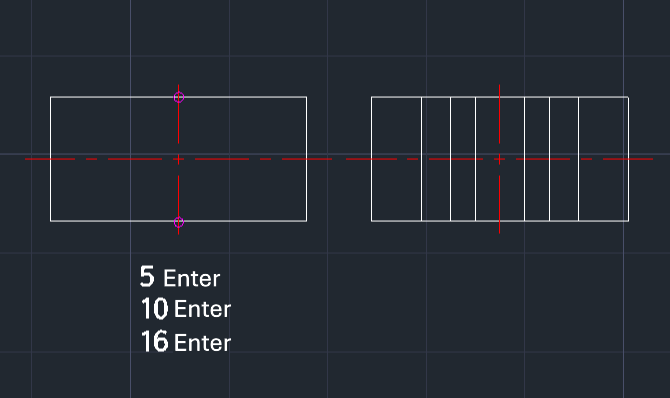
This tool allows you to continuously draw double lines (offsets) on both sides of a central axis by entering diameter values.

  • Functionality: Instead of calculating the radius (half-width) for offsets, you simply input the full diameter. The tool automatically calculates the half-width and draws lines on both sides of the center points you defined.

  • Continuous Input: You can enter multiple diameter values in sequence to draw concentric/parallel sets of lines without restarting the command.

  • Compatibility: This is a dedicated CADian Lisp tool and works only within CADian.


3/ How to Use :

  1. Type 2l in the command line and press Enter.

  2. Click the Center Point (Start of the axis).

  3. Click the Opposite Center Point (End of the axis).

  4. Enter a Diameter Value (e.g., 5) and press Enter. (Draws lines offset by 2.5 on each side).

  5. Enter another Diameter Value (e.g., 10) and press Enter. (Draws lines offset by 5 on each side).

  6. Enter more values as needed (e.g., 16...).

  7. Press Esc to finish the command.


Added to cart.

VIEW CART

Please sign in first.

JOIN