Support

As evidenced by over 30 years of development history, trust-worthy Korean CAD, CADian!

Utility Archive · 2026.02.27
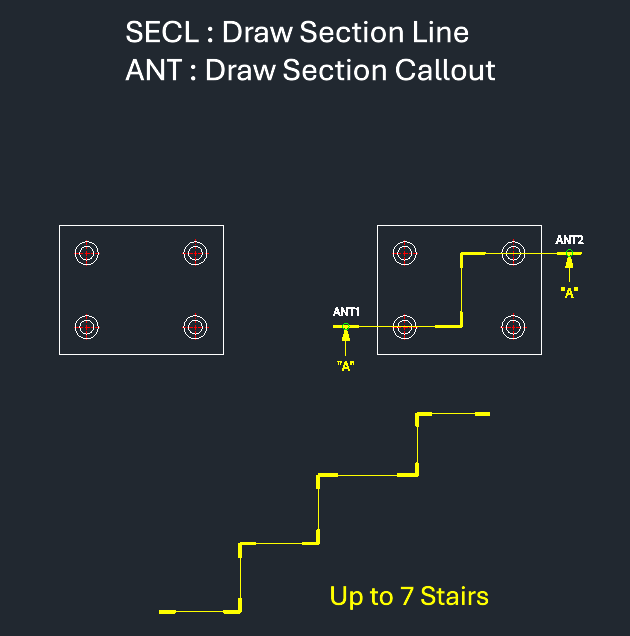
[Lisp #209] SECL / ANT : Draw Section Line / Section Callout

Hi,

This is CADian.

We have prepared 400+ Lisp programs to aid your CAD experience, free of charge!

Full List of all CADian Lisps : [Full CADian Lisp List]

How to Install : [CADian Lisps Download & Install Guide]

====================================================

1/ Command :

  • SECL : Draw Section Line

  • ANT : Draw Section Callout

2/ Description :
This toolset consists of two commands to create section lines and section indicators (arrows and text).

  • SECL (Section Line) : Draws the section line path. It supports creating complex section lines with up to 7 steps/segments. The thickness of the heavy line segments can be adjusted (default is 0.3mm).

  • ANT (Arrow N Text) : Adds the section view arrows and text labels to the ends of the section line drawn by SECL.

  • Compatibility : This is a dedicated CADian Lisp tool and works only within CADian.


3/ How to Use :

For Section Lines (SECL):

  1. Type secl in the command line and press Enter.

  2. Enter the Line Thickness (press Enter for the default 0.3mm).

  3. Click points to define the section line path (up to 7 steps).

  4. Press Esc to finish drawing the line.

For Arrows and Text (ANT):

  1. Type ant in the command line and press Enter.

  2. Click the First Point (AN1) at one end of the section line.

  3. Enter the Section Text (e.g., A).

  4. Click the Second Point (ANT2) at the other end of the section line to place the second arrow and text.


Added to cart.

VIEW CART

Please sign in first.

JOIN